WitcherAccess

WitcherAccess makes The Witcher 3: Wild Hunt playable without sight. Everything the game displays is announced to your screen reader, and the mod adds what the game lacks for a blind player.

Download

WitcherAccess is a free download on Nexus Mods, with its installer for Windows 11.

Download WitcherAccess on Nexus Mods

Fan project, not affiliated with CD Projekt. The Witcher is a trademark of CD Projekt S.A.
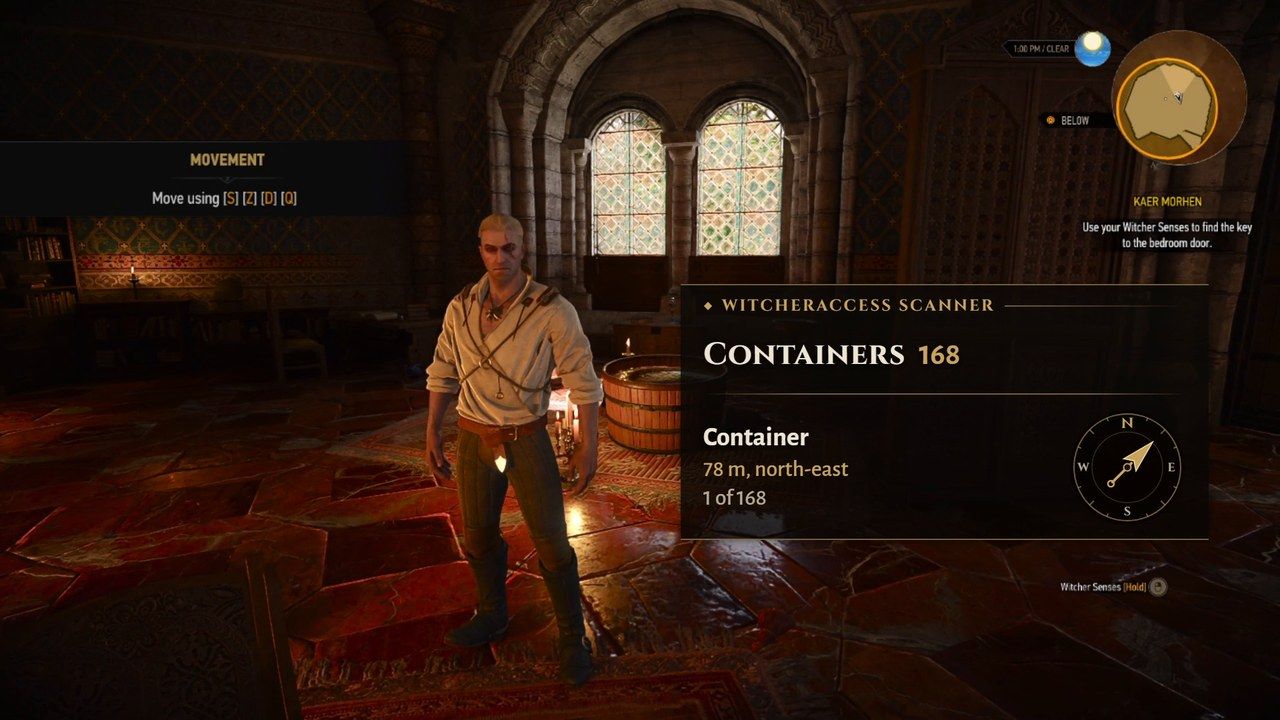
Geralt in a room at Kaer Morhen. A box added when editing the video shows the WitcherAccess scanner on the containers category.

What the mod does

  • Menus, inventory, map, quest journal, dialogue, Gwent, crafting, skills, mutations: everything is read by the screen reader.
  • A scanner describes what surrounds you: characters, items, doors, chests, places, quest objectives, clues, tracks.
  • An auto walk takes you to a target: it can swim, climb ladders, go through doors and even steer a boat.
  • Step-by-step guidance lets you walk to a target yourself, with sounds that indicate the direction, the jumps and the climbs.
  • Alert sounds in combat: enemy attack, dodge, low health, adrenaline.
  • An audio description of cutscenes and dialogue scenes, with synthetic voices, in 17 languages.
  • It resumes on its own if the screen reader restarts.
  • It automatically speaks your game’s language, one of 18.

At a glance

Languages
18, the game’s own, with no setting to change
Audio description
17 languages, synthetic voices
Controls
Keyboard, and largely the controller
Price
Free, for everyone, at the same time

What you need

  • The game, in its remastered version 5.0, on Steam or GOG. On Steam, The Witcher 3: Wild Hunt Complete Edition contains the game and its two expansions.
  • Windows 11, 64-bit: the remastered version of the game no longer runs on Windows 10.
  • Administrator rights on your computer, since the game is usually installed in Program Files.
  • NVDA, JAWS, or simply the Windows voice.

In Steam, set the game’s updates to install only when you launch it: the mod is tied to a precise version of the game, and an update could silence it.

Installing, step by step

Before installing, launch the game once and wait about three minutes for it to reach the main menu: it then creates its controls file, where the installer places the mod’s shortcuts. Then quit with Alt+F4.

  1. Close the game completely.
  2. Run the installer, then accept the Windows permission prompt.
  3. Choose the installer language: French or English.
  4. Check the game folder. The installer finds it on its own, and refuses any folder that does not contain the right version.
  5. Choose your keyboard layout: AZERTY, QWERTY or QWERTZ. The one set in Windows is already selected.
  6. Let the installation finish. A shortcut called The Witcher 3 with WitcherAccess is placed on your desktop.

Always launch the game with this shortcut, and keep Steam open if you have the Steam version. The first start takes noticeably longer: the game recompiles its scripts.

The manual

The full manual, in 18 languages, comes with the mod. It explains everything: your first steps in the game, the scanner, getting around, quests, the map, combat, the menus and the list of keys.

Report a problem

In the game, press Shift+F8: the game saves on the spot, then a small window asks you to describe the problem. Write what happened and press Enter: the report reaches me, with the save and the mod’s logs.

You can also write on the Access Guild Discord, or by email.

The community

Access Guild is the Discord server where players try the mods, ask their questions and send me their feedback. It is mostly in English.

Join Access Guild on Discord

My other mod: Skyrim Access

Skyrim, playable with a screen reader. I started it in January 2026 and developed more than 90% of it. It is now maintained by the community.

Fan project, not affiliated with Bethesda.

Credits

Thanks to alex19EP for a great and valuable contribution to the code, to jeremdo, who supported the project in many ways, to Lirin, who allowed me to reuse their sound beacon system, and to Michael Maslo, for their suggestions. Thanks to everyone who tested the mod.

The audio description voices are synthetic voices (Kokoro, Piper, Chatterbox, Supertonic). The mod talks to your screen reader through Prism, by Ethin Probst, and plays its sounds with the Opus libraries from Xiph.Org.